> For clean Markdown of any page, append .md to the page URL.
> For a complete documentation index, see https://taurushq.ferndocs.com/protect-capital/v3.48/reference/changes/llms.txt.
> For AI client integration (Claude Code, Cursor, etc.), connect to the MCP server at https://taurushq.ferndocs.com/_mcp/server.
# Changes
> **Note**
>
> **In this article**
>
> * This article is intended to supplement the existing API reference for the [Changes](/protect-capital/v3.48/reference/changes) endpoint
> * Details about Changes API and what entities can be set, along with the supported actions and fields for each entity.
> * An example of how to structure the body for a change.
## Introduction
Taurus-PROTECT has a robust change approval system where each change must be approved by admins or in some cases, superadmins. This change management system is powered by the [Changes](/protect-capital/v3.48/reference/changes) endpoints. This endpoint can be used to make changes to users, wallets, whitelisted addresses, and more.
When reading the API Reference, you will notice that creating changes via the API requires telling protect which action and entity you wish to change. Depending on the entity, different actions are supported (usually `create`, `update` and `delete`).
## Changes in Protect
Administration of PROTECT is managed through change requests. When a setting is changed in the GUI, a change is then [visible for approval](/user-guides/docs/changes-1) . Changing a user's signing method, adding whitelisted addresses, or updating prices require a change request and 4-eyes approval process, among others.
The high level change process is as follows:
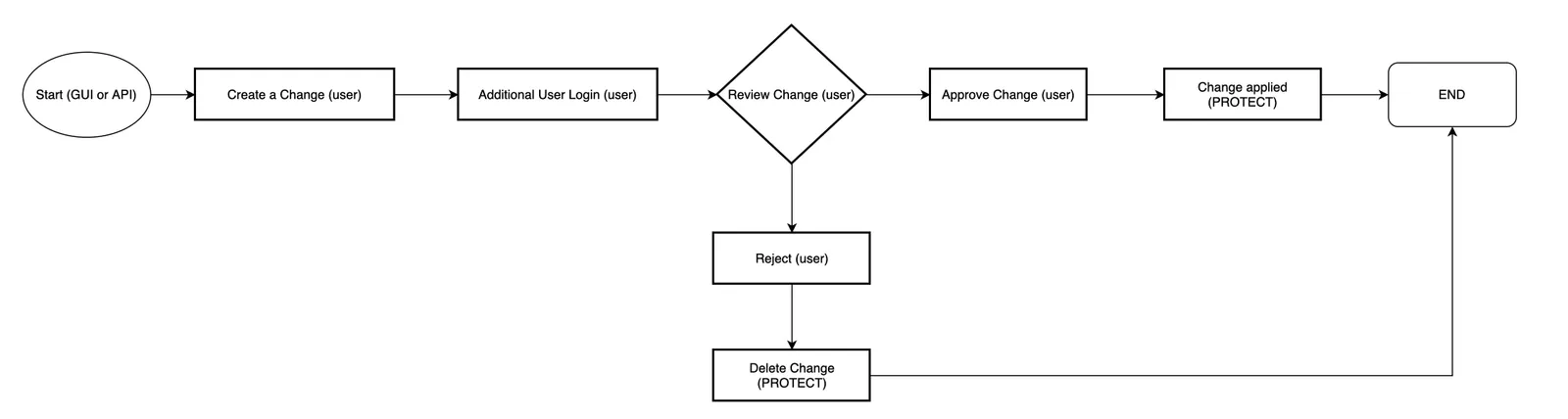
Important considerations:
* Once a change has been created, it cannot be edited. You must reject the change and create a new one.
* A change can be rejected by the same user that created it.
* A change **can only be approved** by a different user with appropriate permissions.
* Example: A change to Price requires the `Price Manager`role. Only users with the `Price Manager` role will be able to approve this change.
* Some changes, such as group associations or public key changes, will generate a separate change in the **governance rules**. Governance rule changes require approvals by the superadmin quorum.
## Entity specific processing rules
The `changes` API implements CRUD semantics on various entities, where each entity type has its own processing rules. Here are some of the entity-specific rules that apply. Note that this list is non-exhaustive.
### All Entities
* You cannot create a change which already exists. The API will return an error.
* Once a change has been created, it cannot be edited. You must reject the change and create a new one.
* Once approved, changes are applied immediately by PROTECT.
### User
* Super admin users cannot be deleted.
* A user's `Super Admin` role cannot be removed.
* Only `firstname`, `lastname`, `email`, `username`, `status` and `roles` can be changed for Super Admin users.
* All users must have an `externalUserID` (typically an email address).
### Groups
* If SSO is enabled, groups changed via SCIM cannot be changed manually.
* Groups are automatically reset for SSO users on the next login, creating an change request.
## Making changes via the API
To create a change using the API, follow these steps:
1. Making a change with the [Create a change](/protect-capital/v3.48/reference/changes/create) endpoint.
2. With the other admin, calling the [List changes for approval](/protect-capital/v3.48/reference/changes/list-for-approval) endpoint.
> ⚠️ Ensure proper review
>
> This endpoint returns all pending changes in the `changes` field. These must be carefully validated prior to approving. Failure to do so could result in an unintended change being approved.
3. Calling [Approve a change](/protect-capital/v3.48/reference/changes/approve)endpoint and passing in the ID of the changes you wish to approve.
1. Alternately you may approve all pending changes by using the [Approve changes](/protect-capital/v3.48/reference/changes/approve-many)endpoint. **The above warning should be taken into careful consideration.**
> **Note**
>
> **Delete**
>
> You will notice in the API reference that passing `change` in the body is not mandatory. This is because`Delete` does not require a `change` body however does require an `entity` and an `entityID`.
## Entity, action, and field mappings
The table below shows a list of valid entities, their supported actions and their valid fields. Fields are supplied in the`changes` property. Note that not all fields may be required and that each entity will have it's own validation. If you have further questions about the validation for an entity, please do not hesitate to reach out to support.
| **Entity** | **Supported Actions** | Valid Change Fields |
| ------------------- | --------------------------------------------------------------------------------- | ----------------------------------------------------------------------------------------------------------------------------------------------------------------------- |
| User | `create`, `update`, `delete`, `resetpassword`, `resettotp`,`resetkeycontainer` | `"firstname",
"lastname",
"status",
"roles",
"externaluserid",
"username",
"publickey",
"email",
"userid",
"keycontainer"` |
| Group | `create`, `update`, `delete` | `"name",
"externalgroupid",
"description",
"groupemail"
` |
| UserGroup | `create`, `update`, `delete` | `"name",
"externalgroupid",
"description"` |
| Exchange | `create`, `update`, `delete` | `"name",
"symbol",
"country",
"website"` |
| BusinessRule | `create`, `update`, `delete` | `"rulekey",
"rulevalue",
"rulewalletid"
` |
| Rule | `create`, `update`, `delete` | `"name",
"description",
"condition",
"action"` |
| Price | `create`, `update`, `delete` | `"blockchain",
"currencyfrom",
"currencyto",
"decimals",
"rate",
"source",
"currencyfromid",
"currencytoid"` |
| TPAction | `create`, `update`, `delete` | `"label",
"autoApprove",
"trigger",
"tasks",
"state"` |
| FeePayer | `create`, `update`, `delete` | `"name",
"network",
"blockchain",
"address"` |
| SecurityDomain | `create`, `update`, `delete` | `"name",
"description",
"mode",
"openid_configuration_url"
` |
| UserApiKey | `create`, `update`, `delete` | `"key",
"description",
"permissions"` |
| VisibilityGroup | `create`, `update`, `delete` | `"name",
"description",
"members"` |
| UserVisibilityGroup | `create`, `update`, `delete` | `"userid",
"visibilitygroupid"` |
| Wallet | `create`, `update`, `delete` | `"address",
"network",
"type",
"balance"` |
| WhitelistedAddress | `create`, `update`, `delete` | `"address",
"network",
"type",
"description"` |
| ManualAccountFreeze | `create`, `update`, `delete` | `"account",
"reason",
"duration"` |
| ManualUTXOFreeze | `create`, `update`, `delete` | `"utxo",
"reason",
"duration"` |
\
## Example
If you wanted to set a price source to CryptoCompare (after making a manual adjustment), you would send a POST request to [Create a change](/protect-capital/v3.48/reference/changes/create) with the following body:
**`Create a change request`**
```json Create a change request
{
"action": "update", // again, the table above shows list of valid actions for each entity.
"entity": "price",
"changes": {
"blockchain": "BTC", // each change entity has it's own backend validation.
"currencyfrom": "BTC",
"currencyto": "CHF",
"source": "cryptocompare.com"
}
}
```
The response if successful would return the result ID and a change would be available at the [List changes for approval](/protect-capital/v3.48/reference/changes/list-for-approval) endpoint. If you query this endpoint and do not see results. Ensure you use a different user that has the appropriate permissions to review the change (in this example, `Price Manager`).
**`Response`**
```Text Response
{
"result": {
"id": "12345"
}
}
```
## Freezing Funds in Protect
* There are two different endpoints for account freezes depending on if a blockchain is balance based (e.g., Ethereum) or utxo based (e.g., Bitcoin).
#### Balance Based Freezes
* Freezing funds on a balance based blockchain is done by initiating a change on the `manualaccountbalancefreeze` entity. Amounts are always in the smallest units for the respective blockchain.
```
{"action":"create","entity":"manualaccountbalancefreeze","changes":{"amount":"100000000","accountaddressid":"12345"},"changeComment":"Freeze this amount"}
```
* Freeding funds on a UTXO based blockchain (such as Bitcoin) requires knowing the ID of the UTXO in Protect:
```
{"action":"create","entity":"manualutxofreeze","changes":{"utxoid":"123456","utxoblockchain":"BTC"},"changeComment":"Freezing this UTXO"}
```
To unfreeze funds, you must create a matching change request with the `"action" : "delete"\` instead of create.
Note the above can also be changed through the Protect GUI by going to the action menu on an address and selecting **Freeze Funds.** This will initiate a change that needs to be approved by an admin.