
Trade
Summary
List of message supported on the trade and otc trade connections
- New Order Single (Client → TDX)
- Order Cancel Request (Client → TDX)
- Execution Report (Client ← TDX)
- Order Cancel Reject (Client ← TDX)
- RFQ Orders in OTC
- Quote Request (Client → TDX)
- Quote (Client ← TDX)
- Quote Response (Client → TDX)
- Execution Report (Client ← TDX)
- Quote Cancel (Client ← TDX)
New Order Single
Order Cancel Request
Used to cancel an order. An order already partially filed will have the remaining quantity canceled.
Execution Report
Order Cancel Reject
OTC RFQs
The OTC Trading of TDX supports the RFQ trading flow. While the flow results in trades, it is substantially different from single orders and its usage in FIX is less mainstream, it is thus described in detail here.
Overview
In this integration the stream of quotes is initiated by sending a QuoteRequest (R) message. When a valid QuoteRequest is received, TDX begins streaming Quote (S) messages. A client accepts a quote by sending a QuoteResponse (AJ) message, and any resulting trade (or rejection) is reported via an ExecutionReport (8). Finally, a Quote Cancel (Z) message marks the end of the quote stream.
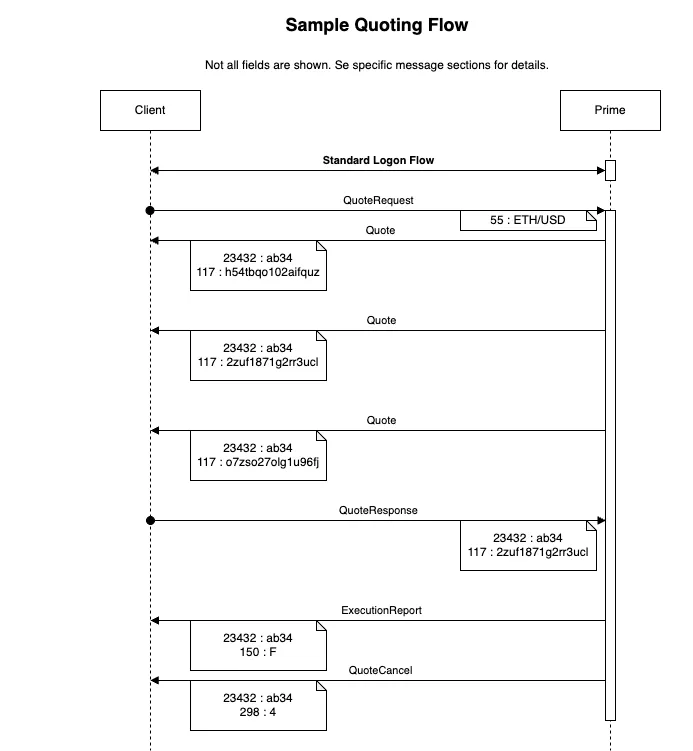
Quote Request
To request a stream of quotes, send a QuoteRequest message :
Quote
The Quote message provides the details of each bid or ask :
Quote Response
To accept a quote from the stream, send a QuoteResponse message :
Execution Report
After accepting a quote, TDX sends an ExecutionReport message that contains the trade’s outcome. While it is also present in normal order flows, the most relevant and RFQ-specific fields are repeated here :
Quote Cancel
When a quote stream terminates or is explicitly cancelled, the following message is sent: